


Why Is AWS Support So Slow — and How to Get Faster Answers
Everyone's Favorite Complaint
AWS may lead the cloud market, but among developers, startups, and enterprises, one complaint keeps coming up: AWS Support is slow. It has become especially visible around generative AI services like Amazon Bedrock, where cases for model access, quota increases, or technical issues can sit for weeks.
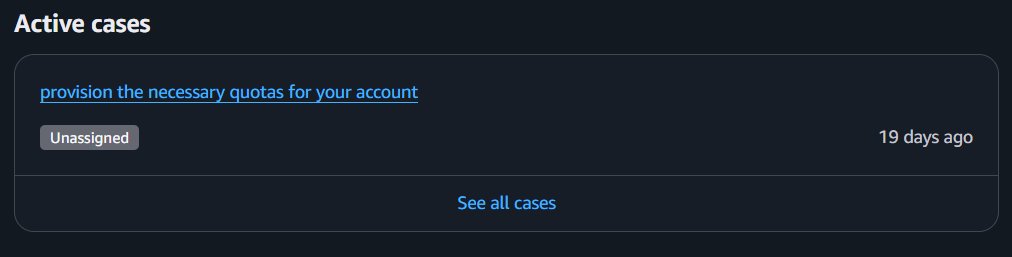
The screenshot above is real: a quota provisioning case, still unassigned after 19 days.
Scroll through X on any given day and you will find posts like "three weeks waiting on a Bedrock quota" or "nobody has touched my support case." So is this a chronic problem? What causes it — and, more importantly, how do you work around it? Here is our field guide, based on what we see daily while operating AWS environments for our clients.
AWS Support Plans and Response Times (2026)
AWS reshaped its support lineup in 2026: the classic Developer and Enterprise On-Ramp tiers are being phased out. Here is the practical picture as of mid-2026:
| Support Plan | Minimum Cost | Stated Response Time | Best For | Realistic Performance |
|---|---|---|---|---|
| Basic | Free | Practically none | Experiments, hobby use | Very slow |
| Business Support+ | ~$29/mo + usage-based fee | 1–4 hours (production impaired) | Mid-size companies running production | Adequate but slow |
| Enterprise Support | $5,000+/mo (usage-based) | 15 minutes – 1 hour | Business-critical applications | Good |
| Unified Operations | Higher | 5 minutes | Mission-critical, AI-heavy workloads | Best |
Note the gap between "stated" and "realistic": even many Business Support+ customers report multi-day silences — particularly on newer services like Bedrock. The stated SLAs apply to production impaired/down severities; general questions, quota requests, and model-access cases live in a much slower queue.
Why AWS Support Is Slow
1. Demand exploded, capacity didn't
The generative AI wave multiplied requests around Bedrock, SageMaker, and related services. Support teams simply have not scaled at the same rate as ticket volume.
2. The layered escalation ladder (L1 → L2 → L3)
First-line (L1) support mostly returns templated answers. Real resolution usually requires the case to reach an experienced L2 or L3 engineer — and that climb alone can take 3–10 days if you don't push.
3. AI services carry extra review overhead
New model access, Provisioned Throughput, custom models, and quota increases trigger additional security, compliance, and capacity reviews. These checks take far longer than a typical limit bump, and high demand means rate-limit and quota friction is constant.
4. Lower tiers get lower priority
Even on the Business plan, priority applies to "impaired" or "down" production severities. Everything else — which is most of what teams actually file — waits.
5. Global scale and timing
Support follows the sun, but specific regions and busy periods (right after new model launches, re:Invent season) see clear slowdowns.
The Bedrock Special Case
Bedrock is one of AWS's fastest-growing services — and the single most complained-about area on the support side. Cases about model access, inference optimization, and latency are consistently among the slowest to move.
If Bedrock is core to your product, our honest advice: go in through Enterprise Support or an AWS Partner. For direct cases, selecting the correct business-impact severity and attaching detailed technical evidence measurably speeds things up.
Mistakes That Make Your Case Slower
- Vague, one-line case descriptions. L1 cannot route what it cannot understand — you get a template back and lose a full round-trip.
- Opening a new case every time. Case history is your leverage; a fresh case starts the clock (and the L1 layer) from zero.
- Marking everything "urgent." Misused severity levels get downgraded, and your account's credibility goes with them.
The Playbook: How to Actually Get Faster Support
1. Write a case that routes itself
Include the exact resource IDs and region, timestamps, relevant logs, screenshots, an architecture diagram if topology matters, everything you already tried, and — critically — the business impact in plain numbers ("blocks launch for 40k users on July 20"). A case an L2 engineer can act on without asking questions skips days of ping-pong.
2. Follow up on a cadence
Add a polite but firm update to the case every 24–48 hours, and explicitly request L2 escalation once L1 answers stop adding information. Silent cases sink; active cases float.
3. Use every channel you have
- If you have a Technical Account Manager (TAM), message them directly — that is what they are for.
- Ask your AWS Solutions Architect to nudge the case internally.
- Work through a trusted AWS Partner — partners have their own escalation paths and often resolve quota and access issues in a fraction of the time.
4. Architect away your support dependency
The fastest support case is the one you never open. Multi-region designs, fallback paths (a second model provider or region for Bedrock workloads), and proper observability with CloudWatch and X-Ray let you detect and route around issues before they become tickets. Our lessons-learned series is full of incidents where resilient design mattered more than any SLA.
5. Re-evaluate your tier honestly
If you run serious production on AWS, the jump from Business to Enterprise often pays for itself the first time a revenue-impacting incident is resolved in an hour instead of a week. Price the downtime, not the subscription.
Conclusion: A Weak Spot You Can Engineer Around
AWS's product and engineering quality remains high, but its support organization has not kept pace with its own growth — and the 2025–2026 AI boom made that gap impossible to ignore. The winning strategy is twofold: build resilient, well-monitored architectures that rarely need support, and when you do need it, come armed with the right plan, a high-quality case, and alternative channels.
At Graf Clouds, we run AWS environments for clients every day — including the escalations. If support wait times are hurting your team, our cloud practice and DevOps team can take that burden off your plate, from architecture reviews that reduce ticket volume to handling AWS directly on your behalf.
Run this in production? Our AWS Managed Services team runs environments like this 24/7 — monitoring, incident response, patching and cost control by named senior engineers, from €3,000/month.